We keep hearing the same question: “If AI can write an app in an afternoon, why would I pay for months of development?” It's a fair question. The answer just isn't what the tool demos suggest.
AI has made writing code cheaper. But on a business application, code was never the expensive part. The expensive part is working out what the app should do, how it connects to your existing systems, who can see which data, and who will fix it in three years. AI helps less with those questions than you'd hope.
Quick answer: AI speeds up writing code, not architecture or user experience. According to IDC, writing code is only about 16% of a developer's time, so writing it ten times faster shortens the whole project by roughly 14%. You get the most from AI on prototypes and routine work. Keep architecture, security and code review with people.
Below is how we would build a business application with AI today: which steps AI shortens, where it adds risk, and what to check before the app goes live.
Three ways to build with AI
When someone says they built an app “with AI”, they can mean three quite different things.
- Tools that generate an app from a description (for example Lovable, Bolt or v0). You write what you need and get a working interface with a database in minutes. You don't need to program.
- Assistants inside the editor (for example GitHub Copilot or Cursor). The developer writes the code, and the AI suggests completions, writes tests and explains existing code.
- Coding agents (for example Claude Code or Codex). The developer gives the agent a task, such as a new invoice export module. The agent works through it in several steps and the developer reviews the result.
The first approach is great for a prototype, or an internal tool used by five people. An application that handles customer data, connects to an ERP and has to run for another five years needs the second or third. In both, a developer who understands the code is accountable for it.
Faster code is not a faster project
My position is simple: AI speeds up writing code, not designing architecture or user experience. Both need decisions. AI can advise on them, but it can't take responsibility for them.
So how much is writing code actually worth? In its 2024 research “How Do Software Developers Spend Their Time?”, IDC found that developers spend 16% of their time on application development. The rest goes to writing requirements and test cases (14%), security (13%), CI/CD, application monitoring and deploying code (12% each), infrastructure monitoring (11%) and user experience (10%). These figures come from a developer survey, so treat them as a rough guide, not a law.
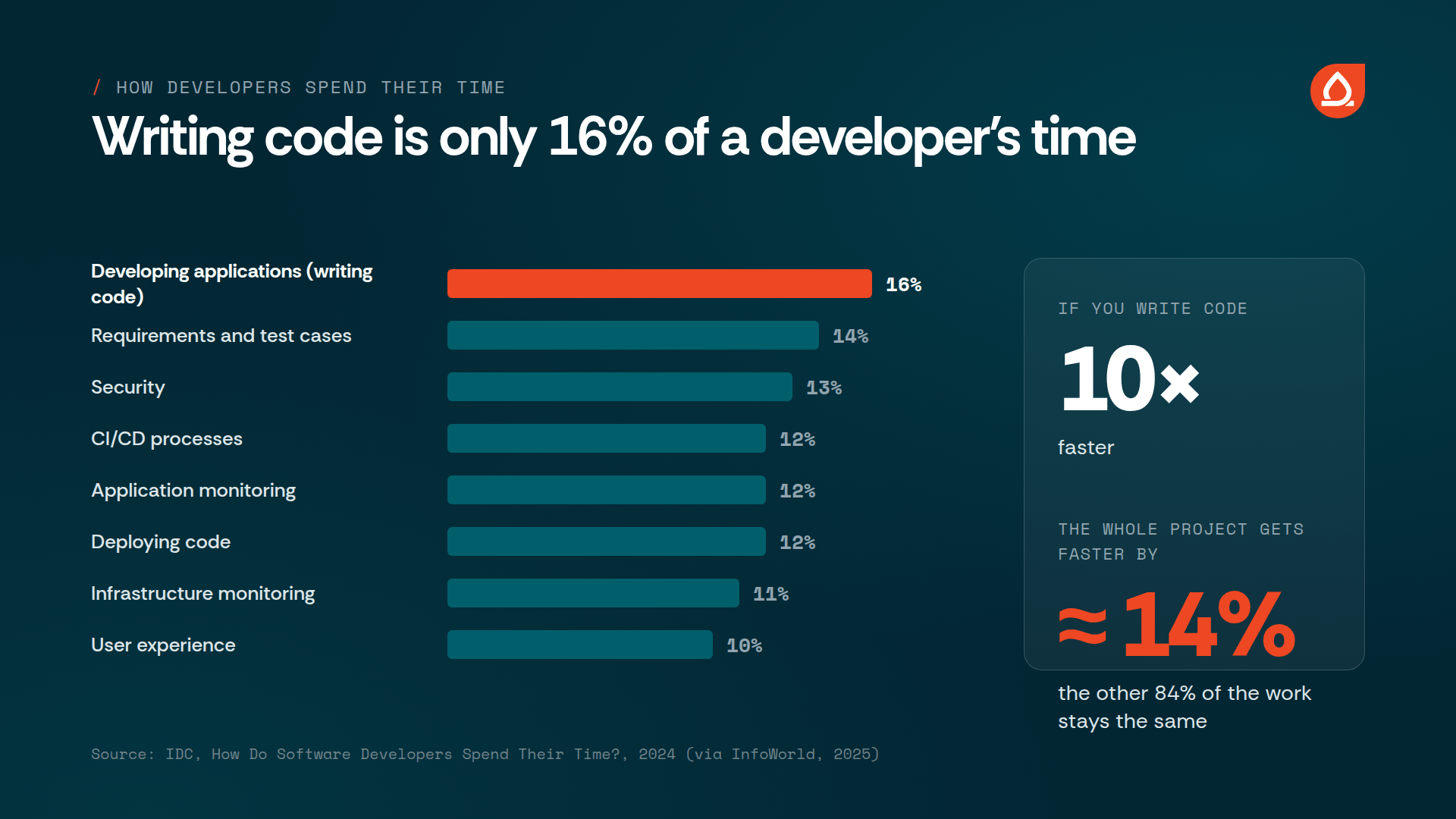
Now the maths. If you speed up that 16% by ten times, it shrinks to 1.6%, and the whole project gets about 14% shorter. That's roughly 1.2 times faster, not 10 times. Even if writing code became instant, you would save 16% at most. And that's only developer hours. A project also has management, design, alignment with the client and acceptance testing, which a coding tool never touches.
Say your project is half coding. Writing code ten times faster then makes the project close to 1.8 times faster, not 10 times. Anyone promising a tenfold speed-up of the whole project has forgotten the rest of the work.
When speed becomes the problem
We've also seen the opposite: projects where speed did damage. Features were built too fast, before anyone had thought about how they fit with the rest of the system. Each new decision was built on the previous one, and a whole chain of wrong decisions piled up. When the problems surfaced, we spent a lot of time testing just to find out where it had gone wrong, and then more time on fixes.
On a project like that, the time saved on writing code disappears quickly. With AI, a wrong decision is cheap to write and expensive to undo, because by the time you notice it, several other things are already built on top of it.
What the research says
The research is less enthusiastic than the tool demos, but it isn't pessimistic either.
In 2025, the independent lab METR ran a randomised trial with experienced open-source developers. On tasks in codebases they knew well, developers using AI tools were 19% slower on average. They estimated afterwards that they had been 20% faster. In February 2026, METR published newer results with some signs of a speed-up, but warned that the way participants were selected makes them less reliable.
The 2025 DORA report, which surveyed almost 5,000 technology professionals, reaches the conclusion we find most useful: AI works as an amplifier. Teams with good tests, small changes and fast feedback gain from it. Teams with weak processes get more code and more problems.
Security numbers are more serious. In its 2025 GenAI Code Security Report, Veracode tested more than 100 language models on 80 coding tasks. In 45% of cases the generated code contained a known security vulnerability. Newer and larger models weren't significantly safer.
Developers know this. In the 2025 Stack Overflow survey, 84% use AI or plan to, but 46% don't trust the accuracy of the output, and only 33% do.
None of this means AI doesn't work. It means the result depends on the process around it, which we describe next.
Building a business application with AI in six steps
1. Describe the process before the app
In our view, the costliest mistake on a business application is solving the wrong problem very well. So start with the process: who does what, with which data, and where it gets stuck today.
AI is a good note-taker and sparring partner here. From notes of user interviews it can produce a summary, user stories and a list of open questions. You can also ask it to look for the exceptions you forgot: what happens when an order is only partly delivered, or who approves a discount above a certain limit. The decisions stay with the people who know the process. And be careful what you paste into a tool if your notes contain personal or business data.
2. Build a prototype in days, then treat it as a specification
This is where AI is strongest. With a tool like Lovable or v0, you can have a clickable prototype in a few days. You find the mistakes in your understanding of the process before you've paid for a single sprint of development.
We had exactly this on AuditReporter, a platform for managing audits for certification bodies. The client came to us with a prototype they had built with AI. That cut the discovery phase down a lot: we didn't have to dig the requirements out of descriptions and meetings, because we could see them on screen. It also helped that the client was technical and knew exactly what they wanted.
But the prototype wasn't the product. Together with the client we improved the user experience, and above all we built a secure system on a stable platform. Prototype code isn't written for production: user login is often simplified, the data model is a guess, and there are no tests. So use the prototype as a specification, not as a foundation. It shows what you want. How it gets built is a separate question.
The same pattern appeared on PlayForward. The client had built a proof of concept with AI and had already sold it to a customer with a fixed launch date. We turned it into a multi-tenant platform and finished the MVP in about three months. If you have a prototype like this, here is what we check when we take it to production.
3. Architecture and the data model stay with people
Some decisions are very expensive to change later: the data model, connections to existing systems (ERP, CRM, e-invoicing), access rights, and where the data is stored. AI can lay out the options and the downsides of each. What it doesn't know is your systems, your contracts and what the company will need in two years.
For the technology, we recommend an established framework with clear conventions, such as Laravel or Symfony for the back end and React or Vue for the user interface. The models learned from a huge amount of public code in these frameworks, and the conventions tell them where each file belongs. Less guessing means fewer mistakes.
4. Write code with AI, but in small steps
The METR and DORA findings point the same way: AI helps least when it has to understand a lot of code without context. Small steps have another advantage: you spot a wrong decision before you build the next ten features on it. This is the process that has worked for us:
- add a file with instructions for the agent to the repository (for example AGENTS.md) that describes the architecture, conventions and things not to do,
- split tasks into changes a developer can review in one sitting,
- have the AI write tests that describe the wanted behaviour first, then the code,
- run every change through automated tests before it's merged.
You save the most on repetitive work: forms, admin interfaces for editing data, migrations, tests and API documentation. You save less on business logic with many exceptions, where a developer has to think through every line anyway.
5. Code review and security
Every line the AI writes has to be reviewed by a person who could have written it themselves. We think this is the most important rule in the whole process. Given the Veracode results, add automated checks too: static code analysis, a scan for libraries with known vulnerabilities, and a check that no passwords or API keys are in the code. Pay special attention to authorisation. Code can correctly check that a user is logged in and still not check whether that user may see this particular record.
The second question is what data you send to the tools. When we went through the process of getting ISO/IEC 27001 certified, we had to sort this out ourselves: which tools we may use, how we protect client code, and who is responsible for review. If an outside vendor is building your application, ask how they handle this. If they don't have a ready answer, that is an answer.
6. Make sure someone understands the application
A business application lives for years. Over that time the law, the processes and the people change. Someone has to understand why the code works the way it does. When a tool built the application and nobody understands it, every fix becomes a guess.
That's why our new developers don't use AI during onboarding. Onboarding lasts one to three months and focuses on understanding, not speed. We wrote about why in AI: the double-edged sword of developer onboarding and in A developer is more than their code. The same principle applies to an application: AI can write the code, but people have to understand it.
How much time and money you save
There's no universal number, and anyone who quotes one without context is selling you a tool. The maths above sets a ceiling, but the real saving depends on the project: it's large on prototypes and routine work, and small on integrations with other systems, alignment with users and edge cases. Those are the parts that usually eat the most time on business applications.
AuditReporter showed this well. The prototype saved us the most time at the start, when we had to understand what the client actually wanted. The user experience, security and a stable foundation remained developer work, and it was just as demanding as it always is.
Also budget for costs that didn't exist before: tool subscriptions, agent usage, and more time for code review. And if your team doesn't have good tests and clear processes, DORA's findings suggest AI will only speed up those problems.
Frequently asked questions
How much does AI speed up application development?
It can speed up writing code many times over, but the whole project much less. According to IDC, writing code is about 16% of a developer's time, so writing it ten times faster shortens the total by roughly 14%. AI doesn't speed up architecture, user experience, testing and alignment with the client to the same degree.
Can I build a business application with AI without a developer?
A prototype or a simple internal tool, yes. An application that handles personal data, connects to other systems and has to be maintained for years, no. Someone has to review the code and be accountable for it.
Does an AI prototype help when I hire a team to build the real thing?
Yes, a lot. Developers understand what you want faster, so discovery is shorter. But don't expect the prototype back as the final application: security, user experience and a stable foundation have to be built separately.
Why can building too fast with AI cost more?
Because wrong decisions pile up. If features are built faster than the team can think them through and check them, each one is built on the last. Finding and undoing a chain of mistakes like that takes more time than the fast coding saved.
Which AI tools are used to build applications?
Lovable, Bolt and v0 for prototypes. Editor assistants such as GitHub Copilot and Cursor, and agents such as Claude Code and Codex, for development. The tools change quickly, but the process around them stays the same.
Is AI-generated code secure?
Not automatically. In Veracode's 2025 study, 45% of the code written by language models contained a known vulnerability. It becomes secure through developer review, automated tests and security checks.
When you need developers
At Agiledrop we have more than 70 engineers working in PHP and JavaScript (Laravel, Symfony, Drupal, Node.js, React, Vue and Angular). They join your team through staff augmentation or as a dedicated team, follow your processes, and use AI where it really helps. If you already have an AI-built prototype, see how we take it to production.